
Stop using people to connect systems that should talk to each other.
Your team copies information between systems, sends notifications, moves leads, creates tasks, chases approvals and updates spreadsheets. Each task seems small, but together they take up hours across the agency.
We connect your systems so these routine steps happen automatically, with human approval where needed.
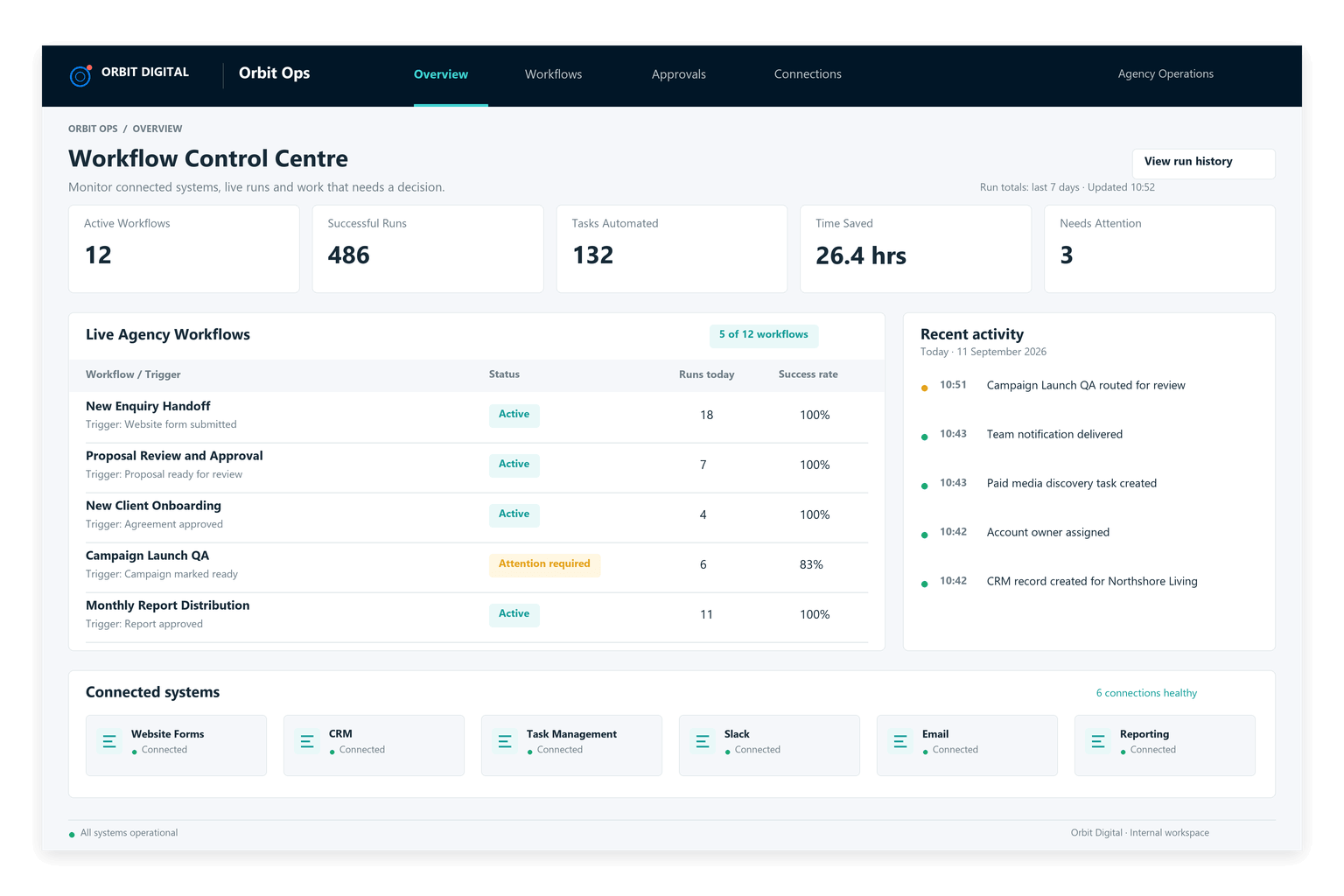
Reporting production time saved
Monitoring time returned to the team
Senior specialist time saved
Specialist audit time saved
Most workflow waste happens between the tasks people were actually hired to do.
Agency teams lose time moving information between tools, chasing updates, creating repetitive tasks and telling other people that something has happened. We automate these steps so information passes between tools, tasks are created and the right people are notified.
Your team still has to move work between tools.
Agencies already use CRMs, project management tools, ad platforms, analytics systems, spreadsheets, email and messaging tools.
People still have to transfer information and keep these tools up to date manually.
Client, campaign and lead data is repeatedly copied instead of passed automatically.
Internal progress depends on messages, memory and manual task creation.
People chase updates rather than the workflow escalating them automatically.
The agency pays expert rates for work that is fundamentally operational plumbing.
Automate the routine tasks your team has to remember.
We map the handoffs, triggers and repetitive admin around agency delivery, then connect the right systems so work moves forward automatically.
Lead & CRM Workflows
Route leads, enrich information, create opportunities, assign owners and trigger follow-up without repetitive manual handling.
Client Onboarding
Create projects, tasks, folders, requests and internal notifications when a new client moves into delivery.
Task Creation & Routing
Create tasks automatically when a defined event occurs and assign them to the correct person or team.
Approval Workflows
Route work for review, track outstanding approvals and escalate delays without relying on somebody to chase them.
Platform & Data Sync
Keep relevant information aligned across systems without repeated copy-paste updates and duplicate entry.
Internal Notifications
Tell the right person what changed, what needs attention and what happens next — without another manual message.
Spend less time copying information and chasing updates.
Your team focuses on client work while the system passes information between people, updates records, creates tasks and sends notifications automatically.
See Workflow Automation Results →Triggers, routing rules, system updates, task creation and notifications move the process forward automatically.
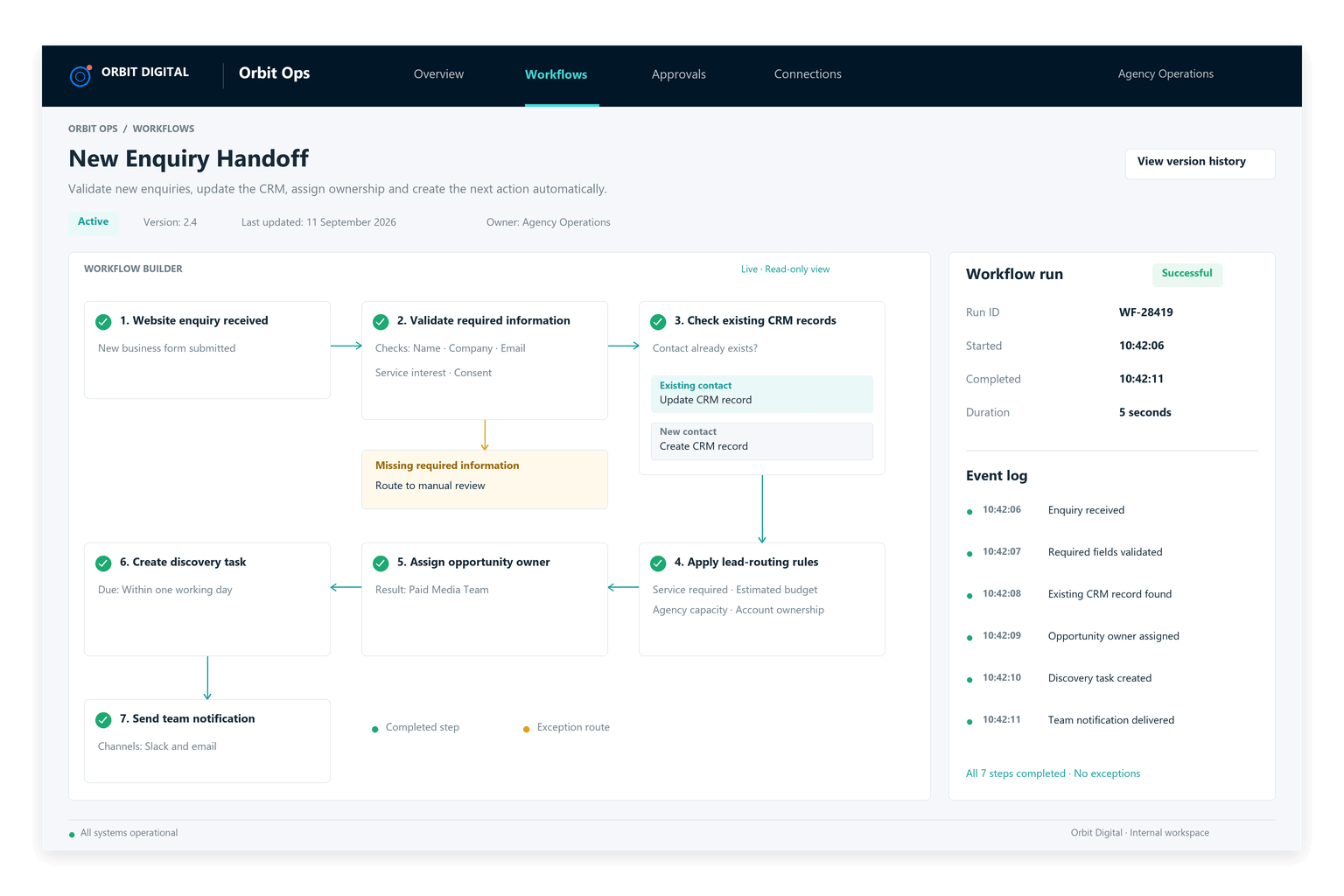
A new lead, validated and routed before anyone needs to chase it.
This example shows how an enquiry moves from submission to an assigned opportunity, with validation, system updates, task creation and team notifications handled automatically.
From website enquiry to assigned opportunity and next action.
The system checks lead information, matches it against CRM records, assigns the enquiry using your agency’s rules and creates a follow-up task before a specialist reviews it.
Stop paying specialists to move work between systems.
Turn recurring handoffs, updates, task creation and approvals into structured workflows that move automatically.
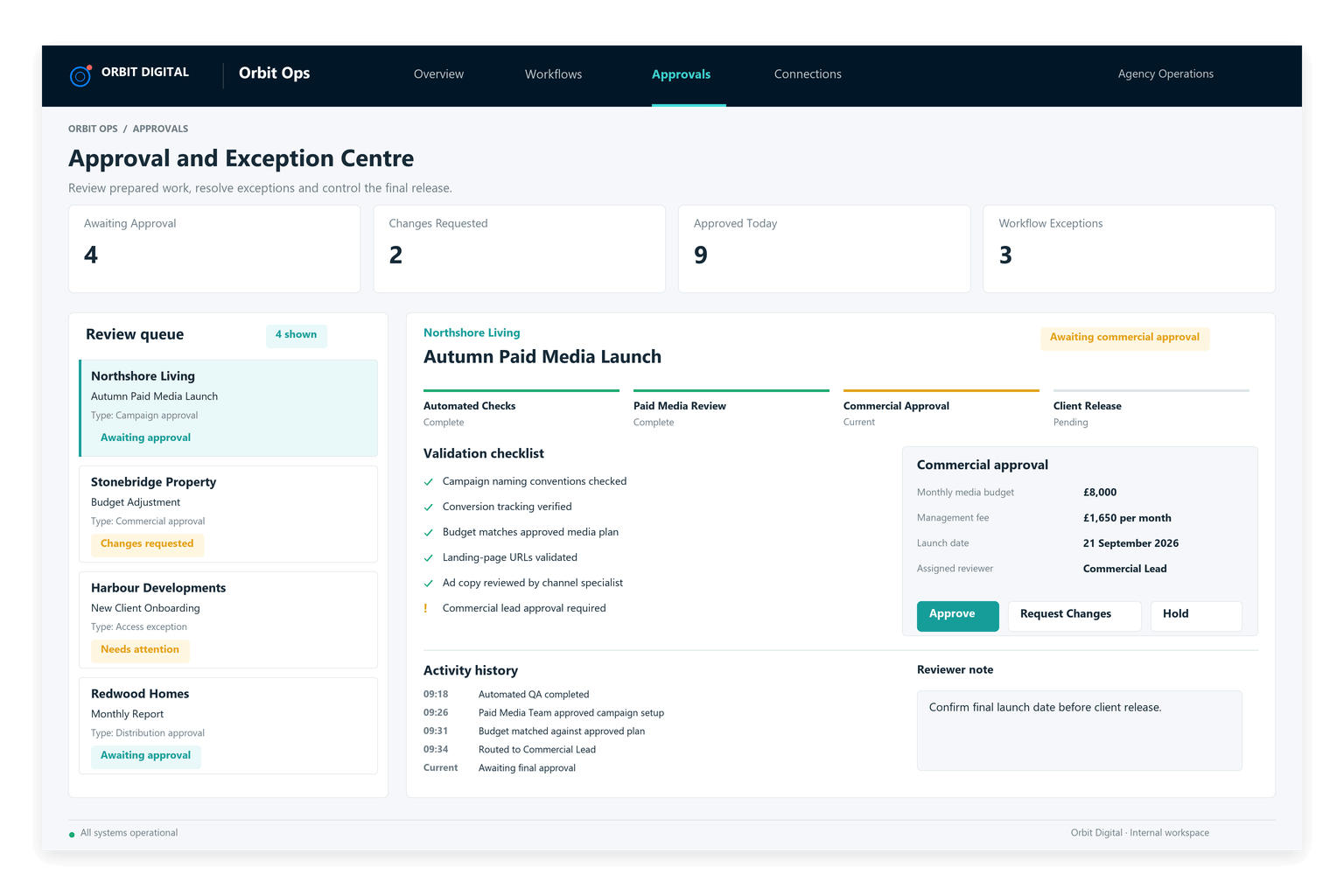
Automate routine tasks and keep important decisions with your team.
The workflow completes routine tasks and flags anything that needs a person’s attention, giving them the information they need to decide what happens next.
Less admin between tasks. Faster work through the agency.
Workflow automation reduces the extra admin and coordination needed as your team grows, takes on more clients and uses more systems.
Less Manual Admin
Remove repeated data entry, task creation, updates and internal messages.
Faster Handoffs
Move work to the next person immediately instead of waiting for someone to coordinate it.
Fewer Dropped Tasks
Reduce dependency on memory, inboxes and manual follow-up.
Cleaner Operations
Set up consistent steps for processes that each person currently handles differently.
More time for specialist work
Give specialists more time for client work by reducing routine admin.
More Agency Capacity
Grow client volume without operational overhead increasing at the same rate.
Map the process before connecting the tools.
Understand how the work should move, remove unnecessary steps and then build the automation around a cleaner process.
Follow the work
Identify triggers, handoffs, manual actions, delays and decision points.
Remove unnecessary steps
Simplify the workflow before introducing automation.
Connect the systems
Create the logic, integrations, routing and automated actions.
Put it into operations
Test real workflows, train users and document how the system works.
15+ years in digital marketing shapes how I build workflow automation.
I’ve managed campaigns, worked across client delivery, reporting, analytics, project handoffs and the day-to-day operational processes that keep agency work moving.
That experience helps me spot routine tasks that can be automated, such as copying information between tools, creating tasks, chasing approvals and updating systems.
I build the workflow around how your agency works, with your team making the decisions that need their judgement.

Jaimie Creek
Founder
What agencies ask before they automate their workflows.
Clear answers about implementation, existing tools, human control and how the system adapts as your agency changes.
No. We start with how work moves through your agency now and preserve the parts that already work. Unnecessary steps, repeated data entry and avoidable handoffs are removed before the cleaner process is automated.
A typical implementation takes five weeks. Week one covers the audit and workflow architecture. Weeks two to four cover the build, integration and testing. Week five is used for training, activation and embedding the system into your agency’s operations.
That step stays with the right person. The system completes the predictable work and routes decisions, approvals, exceptions and specialist judgement to your team with the relevant context attached.
Yes. We start with your existing technology stack and connect the tools your team already relies on wherever they provide a dependable integration route. New technology is introduced only where the current stack cannot support the required workflow.
That is exactly why the process is mapped before anything is built. We identify the common structure, separate genuine client requirements from unnecessary variation and automate the repeatable core while preserving controlled exception routes.
The workflow can be updated as your agency, clients and technology change. New rules, approval stages, integrations and exception routes can be added without rebuilding the entire operating system.
How much time is your workflow wasting?
Map your recurring workflows, identify the manual handoffs and admin, and see where automation could remove the most operational effort.