
Catch campaign problems between account reviews.
Spend can rise, conversions can fall and tracking can fail between scheduled account reviews.
The longer a problem goes unnoticed, the more it can cost in wasted spend, missed leads and time spent fixing it.
Automatically check each account and give your team a prioritised list of issues to review
Account-manager checking removed
Specialist monitoring time returned
Time returned to optimisation and client work
Routine monitoring effort removed
Know which campaigns need attention—without checking every account by hand.
The workflow runs scheduled checks against the budgets, targets and operating rules you define. It flags results outside those limits so your team knows which campaigns to investigate.
Manual account checks don’t scale.
Opening every advertising and analytics account may work while the client portfolio is small. As delivery grows, it becomes a recurring drain on specialist time.
The more accounts each specialist manages, the harder it becomes to check everything frequently enough to catch every material change early.
Automated checks flag issues for your team to investigate.
Overspend can continue between scheduled account reviews
Budget pacing can move outside its agreed tolerance while nobody is actively reviewing the account.
CPA can rise while campaigns continue running.
Ads may still be delivering normally even when the cost per acquisition is well above target.
Conversion failures can look like campaign failures
Specialists can spend time investigating media performance before discovering that measurement has failed.
Specialists spend valuable time checking healthy accounts
Most manual account checks confirm that nothing requires attention or action.
Give every campaign continuous oversight.
Monitor the conditions that matter and send specialists directly to the accounts that need investigation.
Monitor the conditions that put performance and budget at risk.
Monitoring rules are built around each account’s budgets, targets and operating requirements. The workflow runs scheduled checks and escalates only when a defined condition requires attention.
Budget Pacing
Track spend against planned pace and identify accounts moving towards material over- or underspend.
CPA & ROAS Movement
Detect meaningful performance changes against recent baselines, targets or agreed thresholds.
Conversion Volume
Identify unexpected changes in leads, sales or other critical conversion events before the next scheduled account review.
Tracking Health
Flag unusual gaps between traffic, spend and conversion activity that may indicate tracking or measurement issues.
Campaign Delivery
Detect campaigns that stop spending, become limited or stop showing ads, along with other delivery issues you define.
Custom Account Rules
Set monitoring rules for each client’s agreed requirements, known risks and performance targets.
Spend less time checking accounts and more time investigating problems.
Automate the repeated monitoring checks, so specialists begin with the accounts and conditions that need investigation.
See How Campaign Monitoring Works →Defined rules check spend, performance, tracking and campaign delivery.
The alert identifies the account, the rule triggered and the information needed to investigate.
Professional judgement stays with the person responsible for the account.
See what needs attention before the next account review.
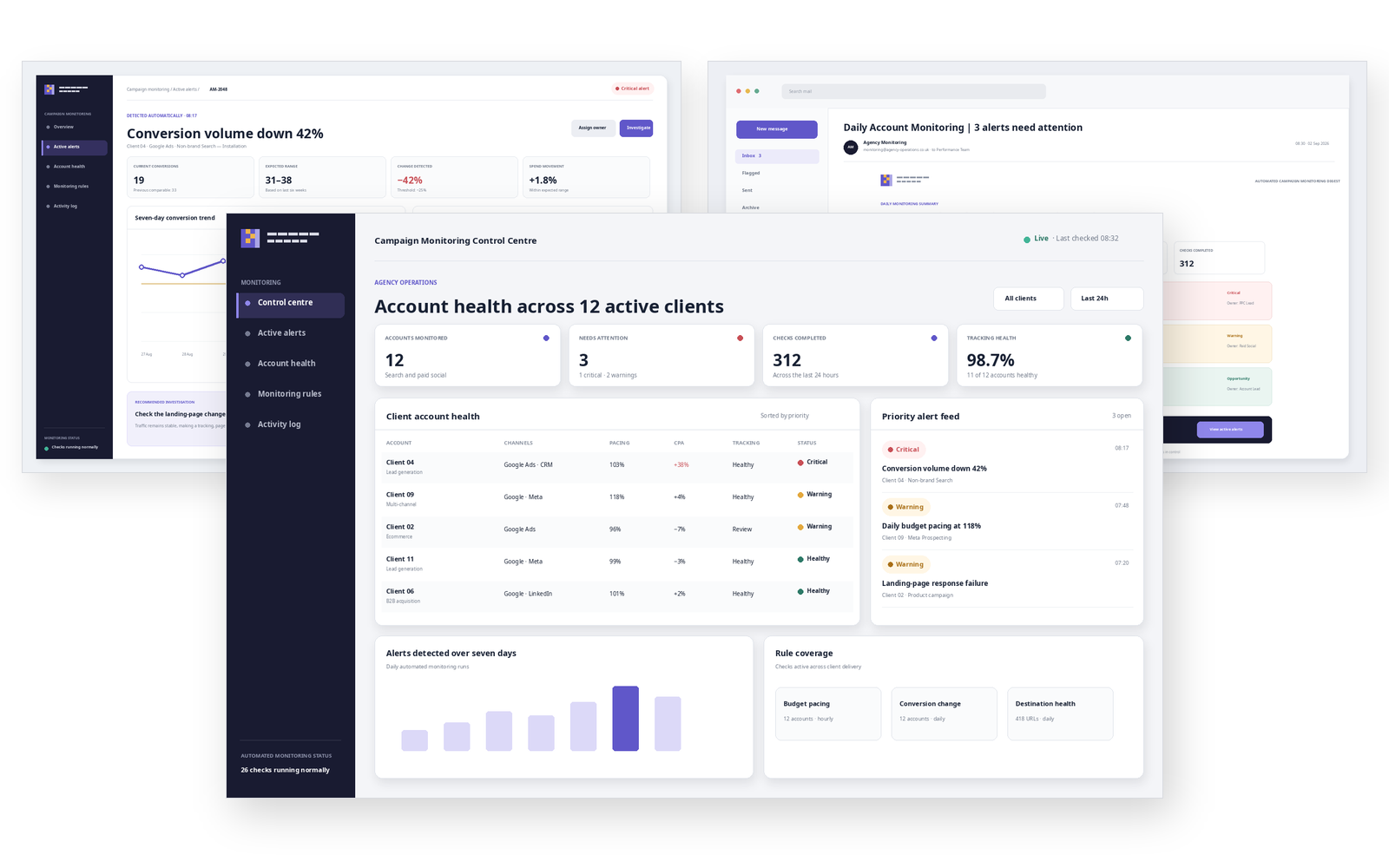
These examples show how scheduled account checks become prioritised alerts, supporting evidence and a clear handoff to the responsible specialist.
One operational view across every client account.
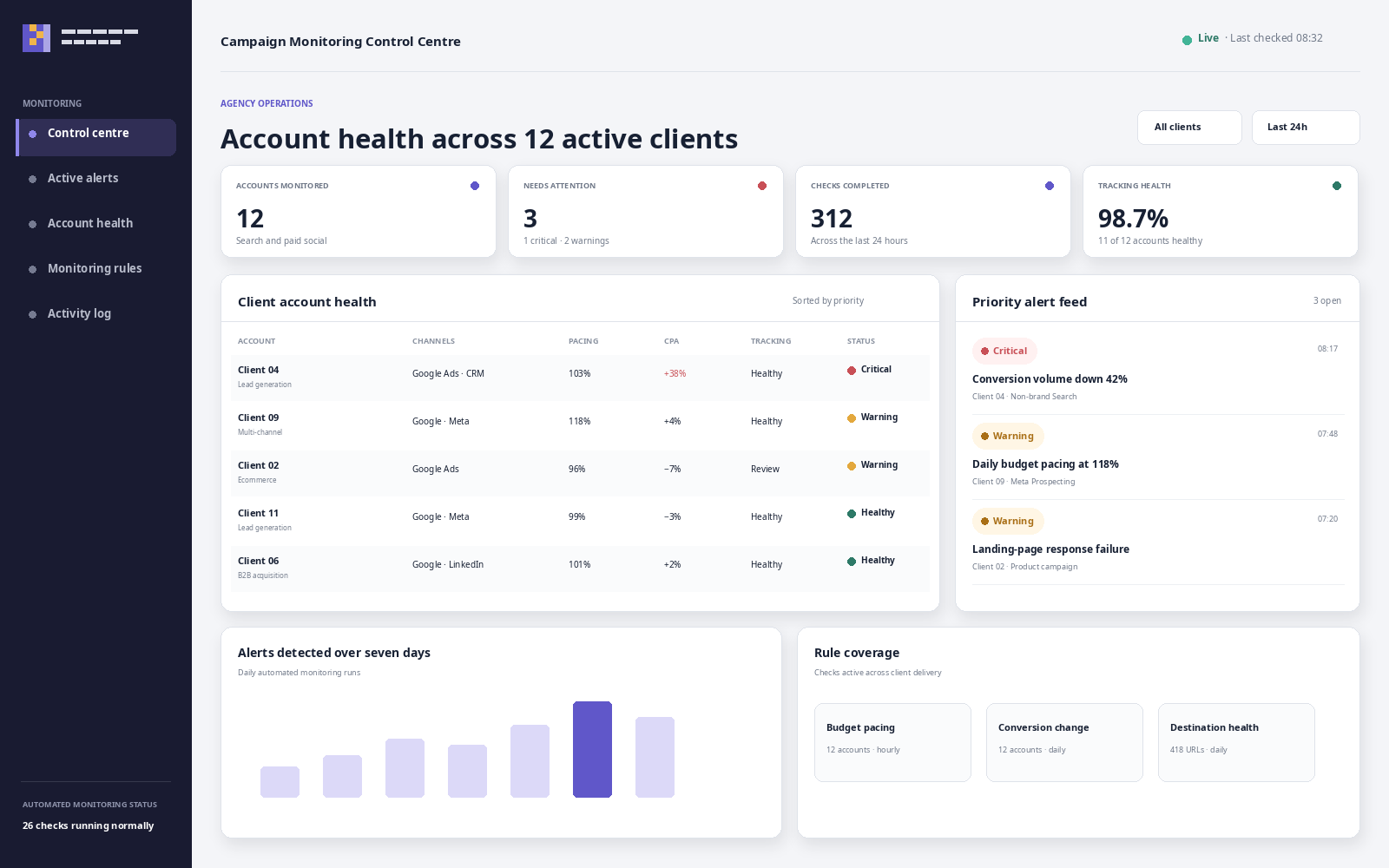
The monitoring control centre shows account health, scheduled checks and unresolved alerts for all your clients, with the most urgent issues shown first.
Know what changed and where to investigate.
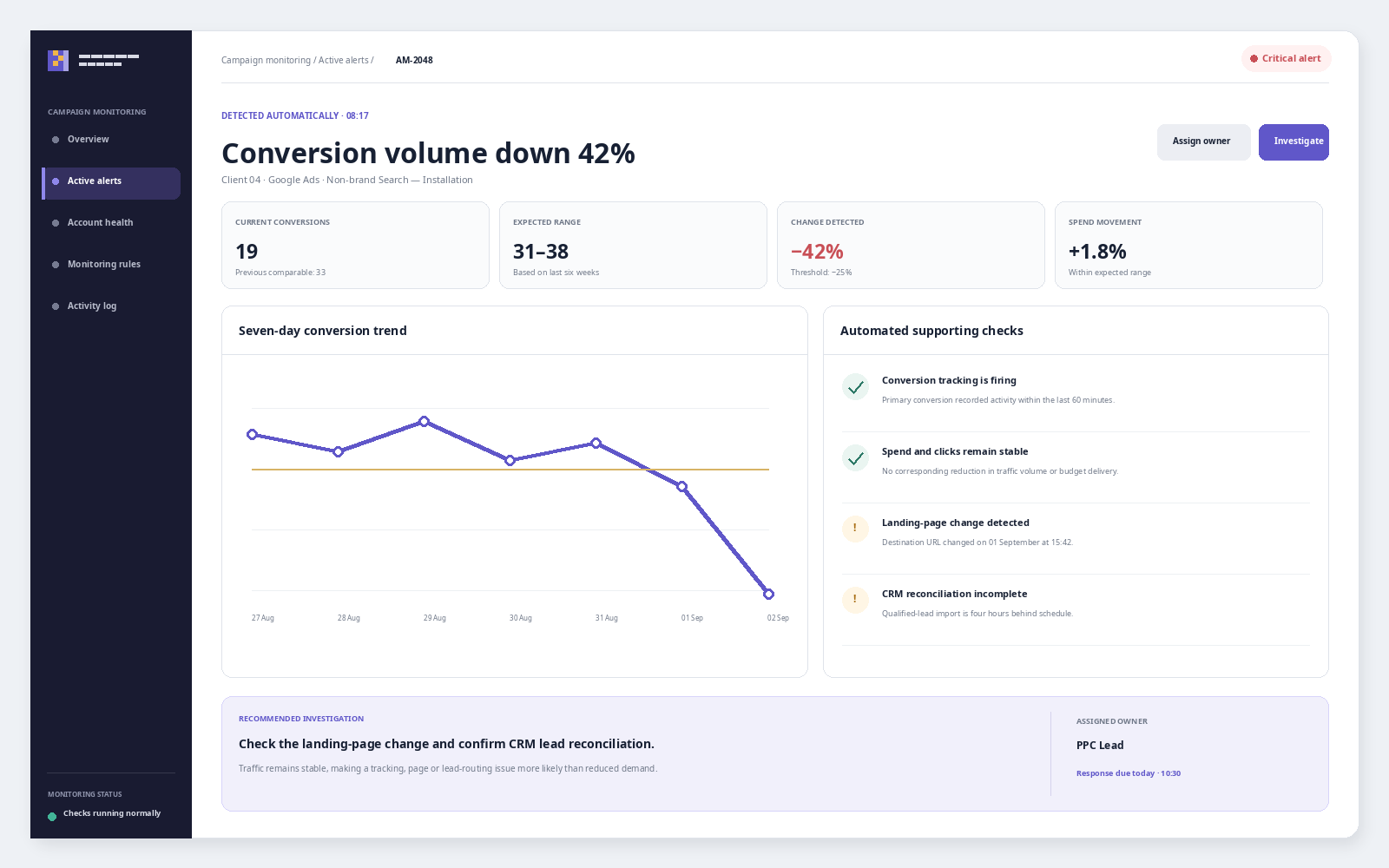
Each alert shows which rule was triggered, what changed in the account and the results of related automated checks, ready for a specialist to investigate.
Build monitoring around the risks your agency actually manages.
Define the accounts, thresholds and escalation rules, then route meaningful exceptions to the right specialist.
Only interrupt the team when attention is actually needed.
The rules allow for normal fluctuations and flag changes outside your agreed limits, then send each alert to the person responsible for the account.
Rules distinguish normal movement from material exceptions, then route each issue to the person responsible for the account.
Find campaign issues sooner and respond faster.
Automated checks flag changes outside your agreed limits and show specialists which accounts need investigation.
Earlier Detection
Surface issues when they happen instead of waiting for the next manual review.
Less Routine Checking
Remove repetitive account checks that usually confirm nothing needs action.
Better Budget Control
Catch pacing problems before they become significant over- or underspend.
Faster Response
Give the account owner the details they need to investigate sooner.
More Account Capacity
Give specialists more room to manage larger portfolios without reducing oversight.
Stronger Client Protection
Reduce the risk of preventable problems going unnoticed for days or weeks.
Start with the checks your team already trusts.
We map your existing account checks, client commitments, risk tolerances and escalation routes before automating the repeatable monitoring work.
Map the Current Checks
Document what specialists inspect, how frequently they check it and why each condition matters.
Agree When to Raise an Alert
Set the baselines, thresholds and acceptable variation that determine when your team receives an alert.
Connect Data and Automate Checks
Connect the required platforms and build scheduled monitoring across the agreed accounts and conditions.
Route, Review and Refine
Deliver alerts into the team’s workflow, test them against real accounts and remove unnecessary noise.
15+ years in digital marketing shapes how I build campaign monitoring systems.
I’ve managed Google Ads and Meta campaigns, analysed performance data, worked with GA4 and conversion tracking, and spent years checking whether accounts are spending, converting and operating as expected.
That experience makes it easier to recognise which changes are normal campaign movement, which signals deserve investigation and which problems can become expensive when nobody spots them quickly enough.
I build the monitoring system around your team’s existing checks and agree with you which changes should trigger an alert.

Jaimie Creek
Founder
Campaign monitoring, without the guesswork.
Clear answers about account checks, alert reliability, human oversight and how monitoring fits into everyday agency delivery.
Checks can cover budget pacing, spend movement, CPA, ROAS, conversion volume, campaign delivery, tracking health, landing-page availability and other conditions relevant to the account. The final monitoring rules are defined around what matters to your agency and clients.
Monitoring can draw from platforms such as Google Ads, Meta Ads, GA4, CRM systems and internal budget or target data. The available connections depend on the platforms your team uses, the data required and the access each platform provides.
Checks can run hourly, daily, weekly or on another agreed schedule. The frequency is set according to the account’s spend, risk, reporting requirements and how quickly the underlying platform makes reliable data available.
Not by itself. Reliable monitoring is built on platform data, calculations and defined rules. AI can help summarise the evidence or suggest investigation steps, but it should not be the sole source of truth for detecting numerical exceptions.
That is precisely what the workflow is designed to prevent. Thresholds, minimum data requirements and escalation rules distinguish normal movement from meaningful exceptions. The rules are then refined against real accounts to remove alerts that do not help the team act.
Yes. One client may prioritise CPA, another ROAS, and another lead volume or strict budget pacing. Checks, tolerances, schedules and escalation routes can be configured around the commitments and operating conditions of each account.
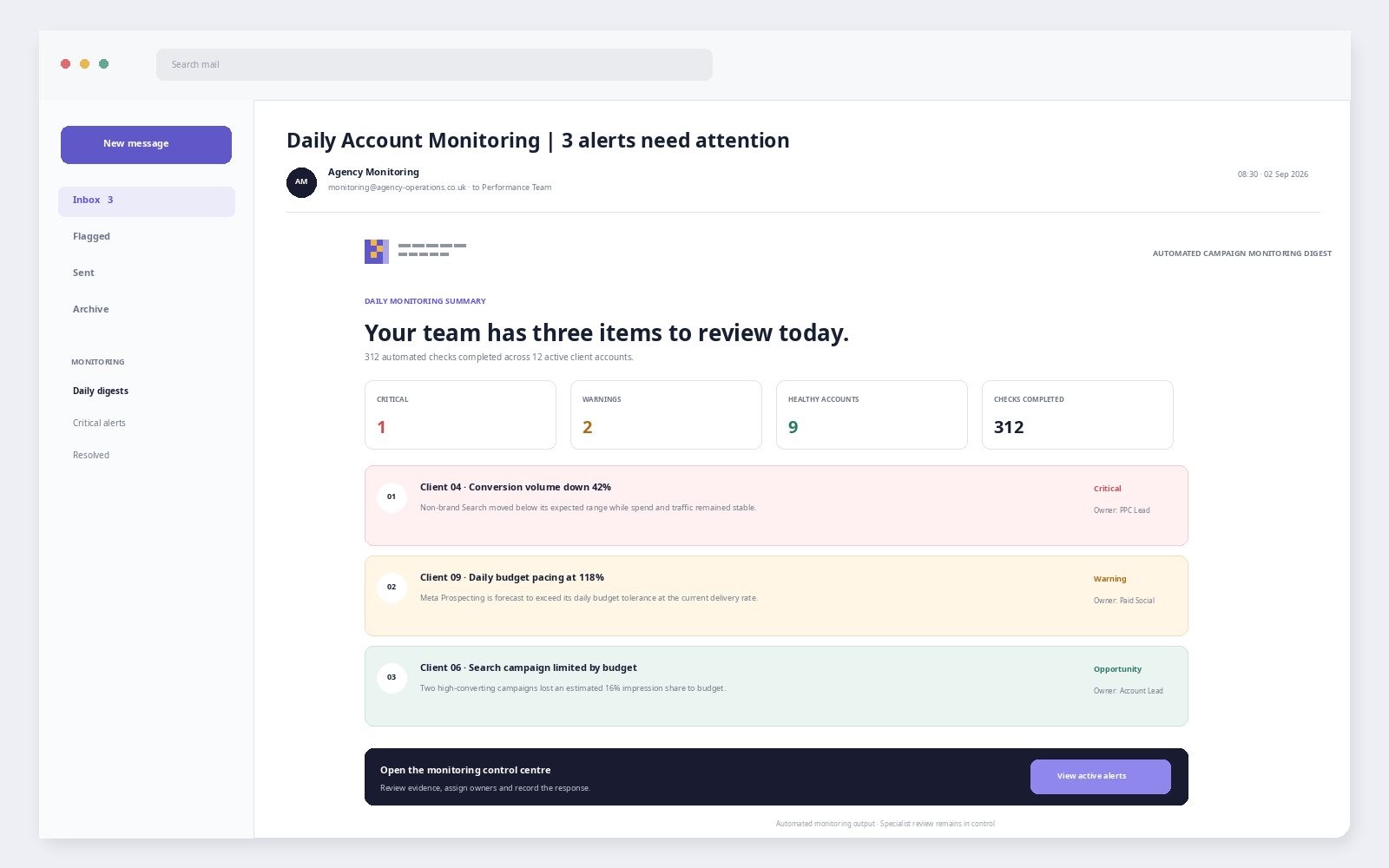
The workflow prepares the affected account, breached condition and relevant supporting evidence. The alert can then be routed through email, Teams, Slack or another agreed channel to the person responsible for investigating and deciding what happens next.
No. Monitoring directs specialists to the accounts that need attention; it does not replace strategy, optimisation or client judgement. Campaign changes remain under human control unless a separately agreed automation has been designed, tested and approved for a specific action.
Catch issues earlier. Put action in the right hands.
Map the checks your team performs today, define what genuinely requires attention and build a monitoring workflow around your agency’s accounts.